#BankTemplate
A bank template project with a good development framework. It is based on Newland SDK and implements various financial transactions.
## Demo
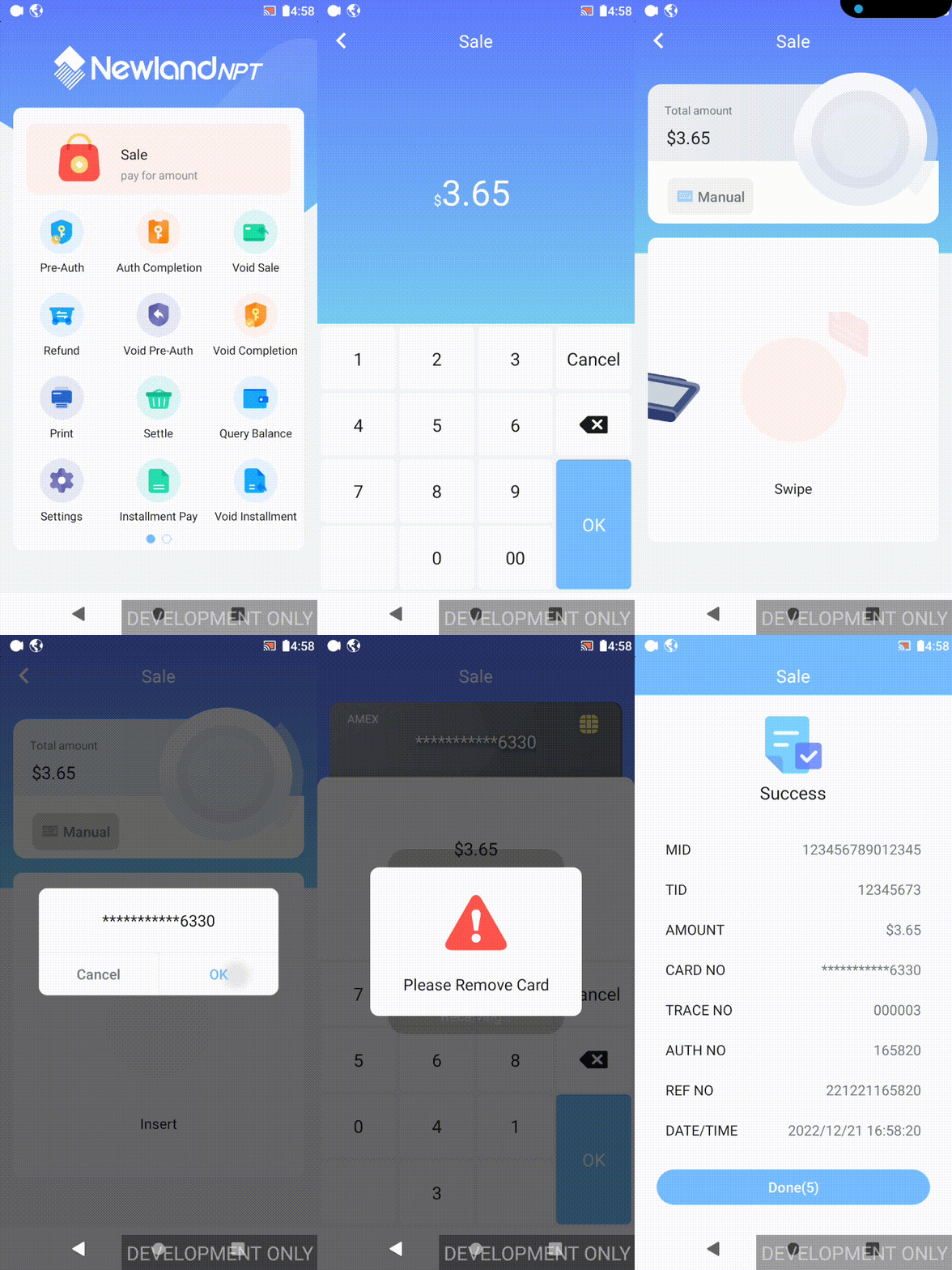
**[demo.apk](readme/NSDK_BANKTEMPLATE-37-3.7-RELEASE-202309110252.apk)** is the **BankTemplate**,and **[platform.apk](readme/ST-PLATFORM_20001_NPI_AN_2.00.01_DEBUG_20221129_signed.apk)** is a local simulation platform. Through these two apk, simulated transactions can be executed on the **development POS**.
Operation: Simulation app-> (Service is open) Configure->Save->Dialog OK. Then, the transaction can be perform on BankTemplate.
> Note: The simulation platform apk can only be performed on the development POS.
 ## Gradle and Environment
| Android Studio | Gradle Plugin Version | Gradle Version | Android SDK |
| ---------------- | --------------------- | -------------- | ----------- |
| 2022.2.1 Patch 2 | 8.0.2 | 8.0 | 33 |
If an error occurs when opening the project, please upgrade Gradle to the latest version. (**Android Studio->Help->Check Updates**)
In order to facilitate project development, **BankTemplate** gradle makes some modifications. There are following differences from native :
- SDK version
- libraries dependencies
- generated APK name
- signing configs
- namespace (Formerly **package** of AndroidManifest.xml)
For specific content, please see **[Gradle Configuration](readme/Gradle Configuration.md)** .
## UI
**BankTemplate** developed the basic themes, element colors, and sizes.
It customizes common views and components, and used multiple Lottie animations, adapts to different screens.
For specific content, please see [UI](./readme/UI.md) .
## Logical Flows
When you click **BankTemplate** on the launcher. the application will process according to the following process:
[App](./app/src/main/java/acquire/app/App.java) is invoked. `App` will Initialize the app basic parameters. The step is on a single thread and it won't affect the UI process. The parameters is the first half of the parameters that the application needs to initialize.
```java
//init data in Application
public class App extends BaseApplication {
@Override
public void onCreate() {
...
BaseApplication.SINGLE_EXECUTOR.execute(() -> {
SelfCheckHelper.initAppConfig(this);
});
}
}
```
Then, [MainActivity](./app/src/main/java/acquire/app/MainActivity.java) will be launch. It will initialize the last parameters on the same single thread as `App`. Because this can make the initialization of parameters execute in an orderly manner. All screens of **BankTemplate**'' are implemented inside a `Fragment`.
```java
public class MainActivity extends BaseActivity {
@Override
protected void onCreate(Bundle savedInstanceState) {
super.onCreate(savedInstanceState);
...
BaseApplication.SINGLE_EXECUTOR.execute(() -> {
SelfCheckHelper.initDevice(this);
...
mSupportDelegate.switchContent(MainFragment.newInstance());
});
...
}
}
```
So the [MainFragment](./app/src/main/java/acquire/app/fragment/main/MainFragment.java) be open to show the main menu by `MainActivity`. `MainFragment` has a ViewPager to show [MenuFragment](./app/src/main/java/acquire/app/fragment/main/MenuFragment.java). `MenuFragment` includes the main menu. If a screen can't display all menu items, you can swipe the screen to the next screen or enter a [SubMenuFragment](./app/src/main/java/acquire/app/fragment/main/SubMenuFragment.java). About main menu, you can see [UI](./readme/UI.md) .
```java
public class MainFragment extends BaseFragment {
...
private void initView() {
...
List childFragments = createMenuFragments(items.subList(1, items.size()));
binding.viewPager.setAdapter(new FragmentStateAdapter(this) {
@NonNull
@Override
public Fragment createFragment(int position) {
return childFragments.get(position);
}
@Override
public int getItemCount() {
return childFragments.size();
}
});
...
}
...
@Override
public void onResume() {
super.onResume();
if (MainMenu.getInstance().isChanged()) {
initView();
}
}
}
```
[TransActivity](./core/src/main/java/acquire/core/TransActivity.java) will be open when the main item is clicked. And then, `TransActivity` will start the transaction.
```java
public class TransActivity extends BaseActivity {
...
private void transact() {
...
AbstractTrans trans;
try {
Class clz = TransUtils.getTrans(pubBean.getTransType());
if (clz == null) {
LoggerUtils.e("Transaction class is null.");
intent.putExtra(TransTag.MESSAGE, getString(R.string.core_transaction_result_no_such_trans));
intent.putExtra(TransTag.RESULT_CODE, ResultCode.FL);
setResult(RESULT_CANCELED, intent);
finish();
return;
}
LoggerUtils.d("Instantiate transaction: " + clz);
trans = clz.newInstance();
} catch (IllegalAccessException | InstantiationException e) {
...
finish();
return;
}
...
trans.init(this, pubBean);
trans.transact((success) -> {
...
finish();
});
}
...
}
```
## Transactions
Each transaction processing is controlled by a transaction class. The transaction class will be invoked when `TransActivity` starts, and `TransActivity` will finish after the transaction class completing.
For specific content, please see [Transactions](./readme/Transactions.md)
## Application Settings
[Settings](./core/src/main/java/acquire/core/trans/impl/settings/Settings.java) is a transaction used for application settings. When `Settings` executes, it will start the [SettingsActivity](./settings/src/main/java/acquire/settings/SettingsActivity.java).
`SettingsActivity` requires the password. There are two passwords for different settings.
- 201003 -> vendor settings. This password is fixed in codes. Vendor settings are used for emergency handling.
- 000000-> admin/merchant settings. This password can be modified in settings or via `core/src/main/asset/default_params.ini`. This settings are used for merchant configure.
## Newland SDK
BankTemplate encapsulates all api related to SDK libraries in the [sdk_helper](./sdk_helper) module.
It includes the following SDK:
- [NSDK](./readme/NSDK.md): includes built-in and external SDK libraries .
- [EMV](./readme/EMV.md): handles the EMV process.
- [TOMS API](./readme/TOMS API.md): includes FlyReceipt and FlyParameters service api.
- [RKL](./readme/RKL.md): is a RKI library.
- [Wireless Dock](./readme/Wireless Dock.md): can bind accessories by the dock box.
## ISO8583
[ISO8583.md](./readme/ISO8583.md) introduces how to pack the 8583 data.
## Gradle and Environment
| Android Studio | Gradle Plugin Version | Gradle Version | Android SDK |
| ---------------- | --------------------- | -------------- | ----------- |
| 2022.2.1 Patch 2 | 8.0.2 | 8.0 | 33 |
If an error occurs when opening the project, please upgrade Gradle to the latest version. (**Android Studio->Help->Check Updates**)
In order to facilitate project development, **BankTemplate** gradle makes some modifications. There are following differences from native :
- SDK version
- libraries dependencies
- generated APK name
- signing configs
- namespace (Formerly **package** of AndroidManifest.xml)
For specific content, please see **[Gradle Configuration](readme/Gradle Configuration.md)** .
## UI
**BankTemplate** developed the basic themes, element colors, and sizes.
It customizes common views and components, and used multiple Lottie animations, adapts to different screens.
For specific content, please see [UI](./readme/UI.md) .
## Logical Flows
When you click **BankTemplate** on the launcher. the application will process according to the following process:
[App](./app/src/main/java/acquire/app/App.java) is invoked. `App` will Initialize the app basic parameters. The step is on a single thread and it won't affect the UI process. The parameters is the first half of the parameters that the application needs to initialize.
```java
//init data in Application
public class App extends BaseApplication {
@Override
public void onCreate() {
...
BaseApplication.SINGLE_EXECUTOR.execute(() -> {
SelfCheckHelper.initAppConfig(this);
});
}
}
```
Then, [MainActivity](./app/src/main/java/acquire/app/MainActivity.java) will be launch. It will initialize the last parameters on the same single thread as `App`. Because this can make the initialization of parameters execute in an orderly manner. All screens of **BankTemplate**'' are implemented inside a `Fragment`.
```java
public class MainActivity extends BaseActivity {
@Override
protected void onCreate(Bundle savedInstanceState) {
super.onCreate(savedInstanceState);
...
BaseApplication.SINGLE_EXECUTOR.execute(() -> {
SelfCheckHelper.initDevice(this);
...
mSupportDelegate.switchContent(MainFragment.newInstance());
});
...
}
}
```
So the [MainFragment](./app/src/main/java/acquire/app/fragment/main/MainFragment.java) be open to show the main menu by `MainActivity`. `MainFragment` has a ViewPager to show [MenuFragment](./app/src/main/java/acquire/app/fragment/main/MenuFragment.java). `MenuFragment` includes the main menu. If a screen can't display all menu items, you can swipe the screen to the next screen or enter a [SubMenuFragment](./app/src/main/java/acquire/app/fragment/main/SubMenuFragment.java). About main menu, you can see [UI](./readme/UI.md) .
```java
public class MainFragment extends BaseFragment {
...
private void initView() {
...
List childFragments = createMenuFragments(items.subList(1, items.size()));
binding.viewPager.setAdapter(new FragmentStateAdapter(this) {
@NonNull
@Override
public Fragment createFragment(int position) {
return childFragments.get(position);
}
@Override
public int getItemCount() {
return childFragments.size();
}
});
...
}
...
@Override
public void onResume() {
super.onResume();
if (MainMenu.getInstance().isChanged()) {
initView();
}
}
}
```
[TransActivity](./core/src/main/java/acquire/core/TransActivity.java) will be open when the main item is clicked. And then, `TransActivity` will start the transaction.
```java
public class TransActivity extends BaseActivity {
...
private void transact() {
...
AbstractTrans trans;
try {
Class clz = TransUtils.getTrans(pubBean.getTransType());
if (clz == null) {
LoggerUtils.e("Transaction class is null.");
intent.putExtra(TransTag.MESSAGE, getString(R.string.core_transaction_result_no_such_trans));
intent.putExtra(TransTag.RESULT_CODE, ResultCode.FL);
setResult(RESULT_CANCELED, intent);
finish();
return;
}
LoggerUtils.d("Instantiate transaction: " + clz);
trans = clz.newInstance();
} catch (IllegalAccessException | InstantiationException e) {
...
finish();
return;
}
...
trans.init(this, pubBean);
trans.transact((success) -> {
...
finish();
});
}
...
}
```
## Transactions
Each transaction processing is controlled by a transaction class. The transaction class will be invoked when `TransActivity` starts, and `TransActivity` will finish after the transaction class completing.
For specific content, please see [Transactions](./readme/Transactions.md)
## Application Settings
[Settings](./core/src/main/java/acquire/core/trans/impl/settings/Settings.java) is a transaction used for application settings. When `Settings` executes, it will start the [SettingsActivity](./settings/src/main/java/acquire/settings/SettingsActivity.java).
`SettingsActivity` requires the password. There are two passwords for different settings.
- 201003 -> vendor settings. This password is fixed in codes. Vendor settings are used for emergency handling.
- 000000-> admin/merchant settings. This password can be modified in settings or via `core/src/main/asset/default_params.ini`. This settings are used for merchant configure.
## Newland SDK
BankTemplate encapsulates all api related to SDK libraries in the [sdk_helper](./sdk_helper) module.
It includes the following SDK:
- [NSDK](./readme/NSDK.md): includes built-in and external SDK libraries .
- [EMV](./readme/EMV.md): handles the EMV process.
- [TOMS API](./readme/TOMS API.md): includes FlyReceipt and FlyParameters service api.
- [RKL](./readme/RKL.md): is a RKI library.
- [Wireless Dock](./readme/Wireless Dock.md): can bind accessories by the dock box.
## ISO8583
[ISO8583.md](./readme/ISO8583.md) introduces how to pack the 8583 data.